


Monet Launcher - Android TV
4.631.00 Reviews
App Specs
- Version
- 1.0.76
- Updated On
- License
- Free
- Downloads
- 50,000+
- Developer
- Klevico
- Categories
- Personalization
- Platform
- Android
Screenshots
 Analysis by AppCompare
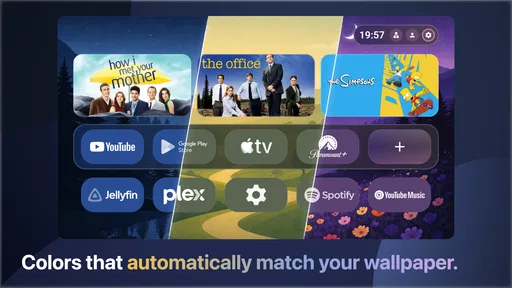
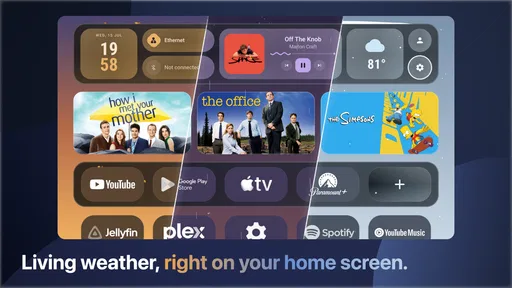
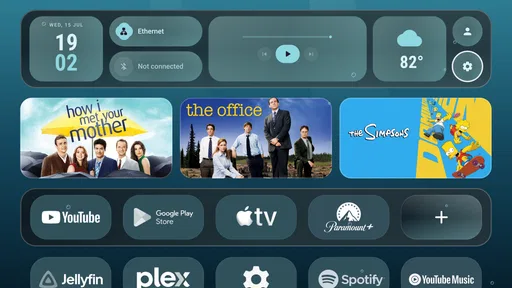
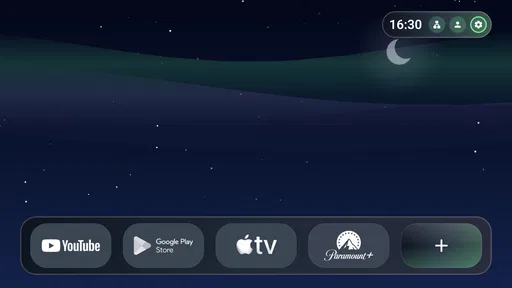
I spent time using Monet Launcher as a cleaner way to organize an Android TV home screen, and its appeal is easy to understand: it puts Material You styling, dynamic color, weather-based live wallpapers, and widgets at the center of the television experience. Instead of treating the launcher as a simple row of app icons, it tries to make the first screen feel more personal and more informative.
That focus makes it different from the usual TV interface, where the home page is often built around recommendations, recently watched content, or large promotional panels. Monet Launcher is aimed at people who want the screen they see every day to feel calmer and more deliberately arranged. I found it most interesting as a personalization tool rather than as a replacement that magically improves every part of Android TV.
A more personal Android TV home screen
The app comes from Klevico and belongs to the personalization category. It is designed for Android TV devices running Android 8.0 or later, which gives it a useful reach across older compatible hardware as well as newer televisions and streaming boxes. The current release is version 1.0.76, and the app has passed the early-experiment stage in practical terms, with more than fifty thousand installs and a 4.6 average from roughly 1.8 thousand ratings.
Those figures do not tell me whether it will suit every television, but they do suggest that the concept has found an audience. The idea is straightforward: replace a visually busy or manufacturer-specific home screen with an interface that leans into Material You design. The important distinction is that the launcher is not simply offering a wallpaper pack. It changes the way the starting point of the TV feels and uses visual customization as its main reason to exist.
On a normal day, I would expect the biggest benefit to appear before I open any streaming service. A launcher is the screen I return to after leaving a movie, switching inputs, or waking the television. If that screen shows a coherent color palette, a useful widget, and a background that changes with the weather, the device can feel more like a personal dashboard than a collection of disconnected apps.
What the free option really means
Monet Launcher is free to download, so trying its basic experience does not require an upfront payment. That matters here because a launcher is a very personal choice: some people immediately prefer a new home screen, while others discover that the default interface is faster for their habits. Being able to test the design before spending anything makes the decision more reasonable.
The app also includes in-app purchases priced at $4.99 per item. I would treat that as an optional paid layer rather than assuming that every part of the experience costs money. The free access is the practical starting point, while the individual purchase price gives users a clear ceiling for considering extra value. If you only want to see whether the layout and Material You look work on your TV, downloading it first is the sensible approach.
Worth Reading Before You Choose

EA SPORTS FC Mobile 26 Is a Bigger Football Game, but It Takes Time

Flipboard Shows What News Apps Must Do Beyond the Feed

Switching to Android Auto Means Rethinking Your Driving Routine

Google Calendar Makes a Crowded Week Easier to Manage

Ludo King Makes the Most of the Minutes Between Plans

Baby Panda World Brings Quick Play to Modern Phones, but Its Game Library Feels Busy
For me, the key question is not whether the app is free, but whether its visual changes are meaningful enough to justify paying for anything beyond the free experience. A launcher does not replace a streaming subscription, add channels, or make video playback better by itself. Its value is concentrated in the moments between those activities: browsing, choosing an app, checking information, and returning to the home screen.
Color, wallpaper, and widgets working together
The strongest part of the concept is the relationship between the dynamic color system and the rest of the interface. A fixed theme can look attractive at first and then become tiring, especially on a large screen that dominates a living room. Dynamic color gives the home screen a way to feel less static, while Material You styling provides a recognizable visual language rather than a random collection of decorative elements.
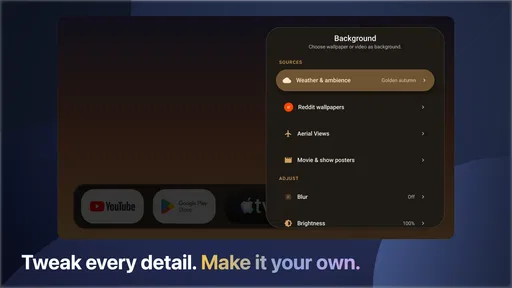
The weather live wallpapers add another layer of atmosphere. I like the idea because the background can make the television feel connected to the room and the time of day, even when I am not watching anything. At the same time, a moving background is not automatically useful. If your priority is the quickest possible route to an app, the visual motion may feel unnecessary. I would keep the effect subtle and avoid treating it as the main reason to install the launcher.
Widgets are potentially more practical. A widget can turn the home screen into a quick glance area instead of forcing me to open another app for every small check. The useful workflow is to keep only information that genuinely helps in the living room, such as weather before leaving home or planning an outdoor activity. Filling the screen with widgets would undermine the clean appearance that makes the launcher attractive in the first place.
A small but important tip is to judge the layout from the distance at which you normally watch television, not from close up while configuring it. Elements that look comfortably spaced on a phone or at a desk can feel too spread out across a television. Conversely, fine details that look elegant nearby may not be immediately readable from a sofa. The launcher’s success depends on whether its personalization remains clear at normal viewing distance.
How it fits everyday TV habits
Imagine finishing an episode late in the evening and returning to the home screen. With a conventional launcher, you may see a mixture of recommendations, service promotions, and recently used content. With Monet Launcher, the emphasis is instead on your chosen visual environment, widgets, and app access. That can make the transition feel less commercial and more controlled, particularly if you already know which services you use most often.
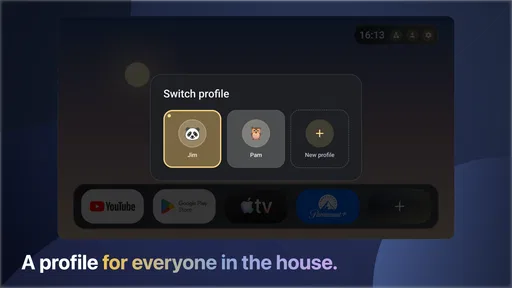
Another realistic use is a shared family television. One person may care about opening a streaming app quickly, while another may appreciate seeing the weather before heading out. A personalized home screen can serve both needs if the app arrangement stays simple. The trade-off is that a family may disagree about the ideal wallpaper, color treatment, or widget placement. In that situation, the launcher is valuable only if the household agrees that a calmer, customized screen matters more than a recommendation-heavy default.
I also see a good fit for a secondary television or streaming box. On a spare screen, the default manufacturer interface may feel especially cluttered relative to how little the device is used. A lightweight personalization-focused launcher can give that display a clearer identity. The benefit is less about adding capability and more about removing visual noise from a device that otherwise feels neglected.
Where the experience may require patience
The first limitation is inherent to this type of app: changing the home screen does not change the underlying streaming services. Your apps, accounts, playback controls, and content libraries remain separate experiences. If your frustration is caused by a particular service’s recommendations or navigation, a launcher can improve the doorway without fixing what happens after you walk through it.
There is also a possible adjustment period whenever a familiar default launcher is replaced. Even a well-designed alternative can make common actions feel different. I would not install it immediately before hosting a movie night or handing the remote to someone who dislikes changes. Give yourself time to arrange the home screen and confirm that the navigation feels natural with the television remote.
Live wallpapers deserve a practical caution as well. They are visually appealing, but motion and changing imagery are not ideal for every room or every user. Someone who wants a completely still background, a very minimal interface, or the lowest possible visual distraction may prefer a simpler launcher or the standard home screen. The weather connection is a nice touch, but it is not a substitute for a dedicated, detailed weather app.
Widgets can create a similar trade-off. They add glanceable information, yet too many of them can turn a clean TV interface into a dashboard that demands attention. My recommendation is to begin with the smallest useful arrangement, then add only one element at a time. This makes it easier to tell whether a widget improves the routine or merely occupies space.
Another consideration is compatibility in the everyday sense. Android TV devices differ in remote layouts, screen sizes, manufacturer software, and the way they handle default launchers. Monet Launcher supports Android 8.0 and above, but that operating-system requirement alone does not guarantee that every television will feel identical. I would test it on the specific device where I want to use it and keep the original launcher in mind as a fallback if navigation feels awkward.
Who is likely to get the most value?
I would recommend trying it first if you care about the look and mood of your television’s home screen. It is especially suitable for someone who finds the default interface too busy, prefers Material You aesthetics, or wants weather and widgets visible without opening several separate apps. The free starting point makes it easy to see whether those improvements feel useful rather than merely attractive in screenshots.
It can also suit users who keep returning to the same small group of apps. When your routine is predictable, a personalized launcher has more room to help because the home screen can be organized around actual habits instead of broad content discovery. In that case, a calmer layout may save small amounts of effort repeatedly, which is more valuable than a dramatic one-time visual change.
I would be more cautious about recommending it to someone who depends heavily on the default television recommendations or wants every service surfaced automatically. The standard launcher may be better if discovery is the main purpose of the home screen. Likewise, people who never look at widgets, dislike animated backgrounds, or want a completely unchanged TV workflow may gain little from switching.
The purchase decision should follow the same logic. Since the app is free to try and paid items cost $4.99 each, I would not buy anything simply because the launcher looks polished. I would first use the free experience during normal routines: opening apps, returning home, checking whether the widgets are readable, and deciding whether the wallpaper remains pleasant after repeated use. Paid value makes sense only if the extra customization becomes part of how you use the television.
My verdict after weighing the trade-offs
Monet Launcher is a focused personalization app, not an all-purpose Android TV upgrade. Its best qualities are the coherent Material You direction, dynamic color, weather live wallpapers, and the possibility of turning the home screen into a useful widget-based starting point. Those features give it a clear identity, and the free entry point lowers the risk of experimenting with a different way to use your television.
Its weaknesses are just as clear. It cannot repair problems inside streaming apps, a moving background will not appeal to everyone, and a new launcher can introduce friction for households that value familiarity above appearance. The paid items also deserve a deliberate decision rather than an automatic purchase, because the core benefit is visual and organizational rather than a major expansion of what Android TV can do.
My recommendation is to try it when your current home screen feels cluttered or impersonal. Spend a little time arranging the screen from your normal viewing distance, keep the widget selection restrained, and see whether the weather wallpaper remains comfortable during daily use. If those changes make the television feel easier and more pleasant to approach, the app delivers real value. If you mainly want instant access to recommendations or dislike changing established remote habits, staying with the default launcher is probably the better choice.
For a free personalization tool with optional purchases, I think it earns a fair trial. The right reason to choose it is control over the atmosphere and organization of your Android TV home screen, not the expectation of new entertainment features. That distinction makes the decision simple: try the free experience, keep it if it improves your routine, and skip paid extras unless you can identify a specific customization you will genuinely use.
Pros
- Clean
- TV-focused interface that feels natural to navigate with a remote.
- Offers a more personalized home screen than many default Android TV launchers.
- App shortcuts make frequently used streaming services quick to access.
- Designed to keep the layout simple and readable from a distance.
- Can make older Android TV devices feel more organized and easier to use.
Cons
- Compatibility may vary across Android TV models and firmware versions.
- Some features may require extra setup before the launcher feels fully useful.
- Replacing the default launcher can be inconvenient after system updates.
- Customization options may be limited compared with launchers for phones or tablets.
- Performance can depend on the device
- especially on older or low-memory TV boxes.
FAQs for Monet Launcher - Android TV
What is Monet Launcher - Android TV, and what does it do?
Monet Launcher - Android TV is an alternative home-screen launcher designed for Android TV devices. It replaces the default interface with a different layout for accessing installed apps, settings, and content. Depending on the device and Android TV version, it may offer a cleaner presentation, customizable sections, or a more convenient way to organize frequently used applications. It is mainly intended for users who want to change the appearance or behavior of their TV’s standard launcher.
Is Monet Launcher compatible with every Android TV device?
Compatibility can vary between televisions, TV boxes, and Android TV versions. Monet Launcher may work correctly on many devices running Android TV or Google TV, but some manufacturers restrict replacement launchers or handle the home button differently. Before installing, check the app’s store listing and your device version. Older hardware, customized firmware, or uncertified TV boxes may experience missing features, navigation problems, or difficulty setting Monet Launcher as the default home screen.
Can Monet Launcher be set as the default launcher on Android TV?
In many cases, Monet Launcher can be used as the home application, but the exact process depends on the device manufacturer and system software. Some Android TV devices allow you to select a default launcher through system settings, while others continue opening the built-in launcher when the Home button is pressed. You may need to grant permissions or use additional settings tools. If the option is unavailable, Monet Launcher may still be opened manually from the app list.
Does Monet Launcher support remote-control navigation and Android TV apps?
The launcher is intended for television use, so basic navigation with a directional remote, select button, back button, and home controls should be the main focus. However, the experience can differ depending on the remote and firmware. Installed Android TV applications should remain available, although their placement and visibility may depend on the launcher’s organization system. Apps designed only for touchscreens might not appear or function properly without a compatible remote, mouse, or other input device.
Is Monet Launcher safe to install, and can I uninstall it later?
As with any launcher, download Monet Launcher from a reputable source and review the permissions requested before installation. A launcher may need access related to displaying apps or becoming the home application, but unusually broad permissions deserve careful consideration. Installing it should not normally erase your applications or personal files. If you decide it is not suitable, you can usually remove it through Android TV settings, select another default launcher, or disable it if the device treats it as a system component.


